
i am not using my recycle bin and am use to delete files permanently by using shortcut Shift + Delete. So, Recycle Bin is just a kind of Desktop mess to me… If you are also the one who do not use Recycle bin and want to clear it out, the just follow the following steps to remove Recycle bin.
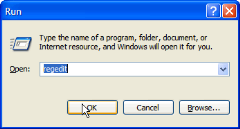
- Press Windows Key + R. This will open Windows RUN Dialog box.
- Write in regedit and press enter.
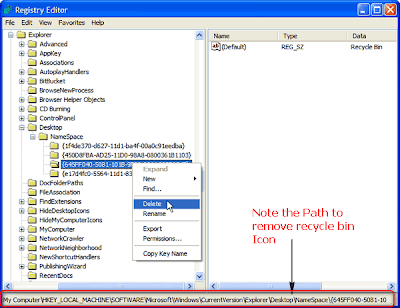
- Navigate to following key-
HKEY_LOCAL_MACHINE\SOFTWARE\Microsoft\Windows\CurrentVersion\Explorer\Desktop\NameSpace - Find and delete the following key in Namespace folder
{645FF040-5081-101B-9F08-00AA002F954E}
 Mohan Desai is from mumbai-India, student. love to write on stuffs related to Technology, Internet, computers, tricks, reviews, etc.


Recent Comments