Download TeamViewer

Monday, August 24th, 2009

TeamViewer is a Computer Software Package for Remote control, Desktop sharing and file transfer between computers,

its a Remote access software. basically when you install it generates an ID and PASSWORD which you can give to your friend so he can have access to your computer through this TeamViewer software.

team-viewer-for-remote-desktop-sharing

The Best thing about this software is that this will show you that what your friend Doing with your pc and for that reason it is secure because everything is going through your eyes,

TeamViewer is download by more than 15,000,000 Users and it spread over more than 50 countries

Basically this TeamViewer software comes in two version
1, Commercial
2, Non-Commercial

use Non-Commercial version if you want to use at home and it is totally free,
and if you plan to use Commercial TeamViewer than you have to pay money for that,
Link: Click Here to Download TeamViewer

Download Windows Live Writer

Monday, August 24th, 2009

Download Windows Live Writer is well known tool for all Blogger,

It is Desktop based Tool for Bloggers to publish their blog content directly from desktop,

And for that you don’t have to visit you admin account at wordpress you can write post with the help of windows live writer and you can publish your post from windows live writer , and even you can edit your post also,

Still now windows live writer is one of the best desktop tool for blogger

Key benefits of windows live writer :

  • It support major blogging platform like Blogger, Wordpress, Self hosted wordpress blog, Typepad
  • Spell check
  • Offline editing
  • Save post as Draft
  • Change image size
  • HTML editing You can use all features like wordpress

This tool is one of the best if you your main language is not English because it has spell check option which is really good you can click on right side and you will get some suggestion of your word select the right word ,

Link: Download Windows Live Writer

Google Book Downloader : How to Download & Save Google Book as PDF?

Monday, August 10th, 2009
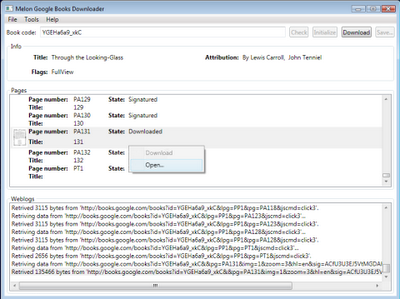
Google Book Search a unique place to search and read your favorite books before actually purchasing or to take reference from that book for your documents. Google Book search lets you to download non copy write and public domain books and documents in PDF format. But you can’t download copy write Books from Google Book Search. A several restrictions are enforced for preventing downloading of copy write books, at max you can read some pages from that book. Here is small utility Google Book Downloader 0.1.0 for downloading and saving of books as PDF format from Google Book search.


Google Book Downloader 0.1.0 can only download books which are marked as to full view. If you try to download copy write book then it not download all pages of book.

Download Google Book Downloader 0.1.0 Alpha 2.


Make your own Free Customize iPhone Ringtone

Monday, August 10th, 2009

The
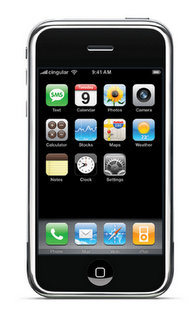
Iphone changed the range of mobile phone! Peoples are searching for new accessories. Today, instead of searching the Iphone Ringtones? Why not you make your own Iphone Ringtones

Easy Steps for making Free your own Iphone Ringtones

1. Lunch ITunes
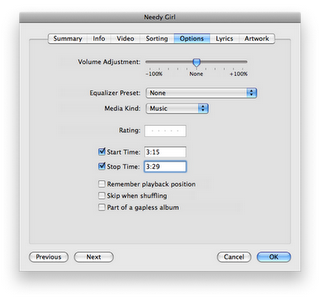
2. Find the Song which you want to use as IPhone Ringtone, Adjust the start and stop times where you want to make as ringtone
3.For MAC user (contol-Click) or For Window users (Click right) and select “Get info”
4.Click the OPTION TAB and set the start time and stop time. But before cutting the song, please asure that make a backup of that song so you don’t accidentally shorten the song itself

5: Control-click (Mac) or Right-click (Windows) the song again and select ‘Convert Selection to AAC’ and iTunes will convert the song as another copy in the AAC format.

6: Now Control-Click or Right-click the ringtone and select ‘Delete’ making sure to click on the “Keep Files” button

7: Locate the file you just created. Typically located in your home directory under Music > iTunes > iTunes Music and then under the band’s name, the file you’re looking for will have an m4a extension

8: Now replace the ‘m4a’ extension of the ringtone file with “m4r” , so if the file is named MrRoboto.m4a the new file will be called MrRoboto.m4r - you’ll get a warning about changing the file extension time but click “OK”

9: Double click to open the ringtone file you just renamed. iTunes will automatically add this new ringtone to the Ringtones folder within the application

10: Finally, connect your iPhone and sync your new ringtone! You can then select it as any other iPhone ringtone via your iPhone settings.

Source


How to View Opera Cache

Sunday, August 9th, 2009
All browsers have cache, which saves web pages and its elements on your computer so that you can access the same page faster when you open it next time.

But this cache is not visible by default, and you cannot see what items are stored in it. This problem can be solved with a freeware that lets you browse through your Opera browser cache.

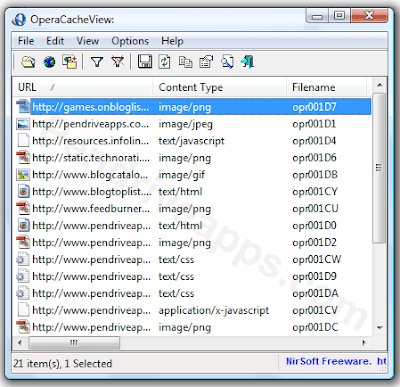
Opera Cache Viewer displays the list of all files stored in Opera’s cache (fetches them from the cache folder). It also shows when it was last accessed, modified and its file size. You can also save any files that you missed while browsing that website.

LINK: Download Opera Cache Viewer


VLC Media Player 0.9.0 Pre-Release Includes Last.FM Support

Sunday, August 9th, 2009
VLC Media Player is a quite well-known player that haven’t released any major upgrade since 4 years. They have released a pre-release test version of VLC 0.9.0 which packs up 2 years of development.

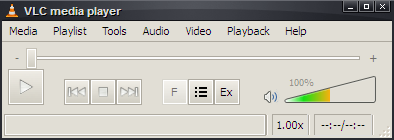
One of the first things that you will notice in this version is the revamped interface (can be seen in the screen shot ) and another feature that has been added is the Last.FM support. Your Last.FM account will update as you play music through VLC.

Other features included in VLC 0.9.0 are:

  • Improved playlist support: Shoutcast TV listings, Audioscrobbler/Last.FM support (in supported countries), album art, and more
  • Better tag support
  • Supports most types of subtitles
  • New and enhanced filters
  • Improved mouse gestures
  • Full support for meta data editing (ID3v2, Ogg/Vorbis, AAC, APEv1/2

LINK: Download VLC 0.9.0 Pre-Release

Scan files for Viruses online with 24 Anti-Virus Engines

Tuesday, August 4th, 2009
Now Days Viruses and Malware are growing in internet and we face each day some problem for this, some of them are so harmful to your computer you can loss all your data also,
And not all Anti-virus software can detect them, if you downloading some files from internet than you may also get virus with that,
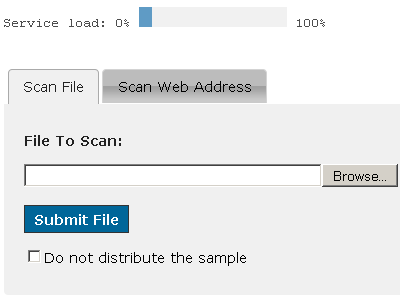
Now you can scan your file online with 24 Different Robust Anti-virus Engines for scanning a particular file for Viruses and Malware,

No Virus Thanks is a Online Scanner which can scan files, which you think may contain threats, with 24 Different AV Engines, The service is fast and will scan any given file with Robust Anti-Virus Engines.

link: No Virus Thanks

Also see :Download Kaspersky Anti-Virus 2010 9.0.0.463

Download Nero 9 Free For Life Edition

Saturday, August 1st, 2009
Nero is one of the most used software Because we Required this software to Burn Our CD’s and DVD, we have to purchase license copy to run this software but now Nero 9 available for free,
Nero 9 is free for life,this is a limited time offer,

Nero 9 now available for free, this software comes with 55 MB Now burn your CD and DVD free ,


links: Download Nero 9 Free Edition

Free Photo Editing

Thursday, July 30th, 2009
When you a see a howling photo in front of you, you immediately think of some software from which it could be made. Adobe, Irfanview are the names of the some of the softwares that might strike your mind but there are tremendous softwares that are available free of cost and apart from softwares, there are a more than a dozen of sites that do the photo-editing service absolutely free. So this post is basically aimed at making you aware about the various kinds of sources that are available for photo-editing.

Firstly I am providing you the list of softwares and after that the list of photo-editing sites will follow.

SOFTWARES

  • GIMP :

    GIMP is an acronym for GNU Image Manipulation Program. It is a freely distributed program for such tasks as photo retouching, image composition and image authoring.

    It has many capabilities. It can be used as a simple paint program, an expert quality photo retouching program, an online batch processing system, a mass production image renderer, an image format converter, etc.

    GIMP is expandable and extensible. It is designed to be augmented with plug-ins and extensions to do just about anything. The advanced scripting interface allows everything from the simplest task to the most complex image manipulation procedures to be easily scripted.

link: GIMP

Sunday, May 24th, 2009

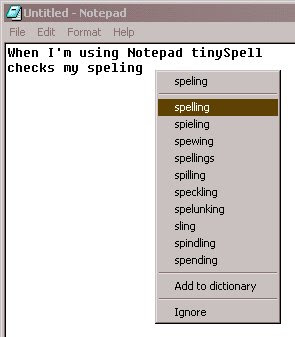
my first language is not English and thats why it is difficult for me to write on any topic & hope that few of you also have this same problem thats whay today i am come here with very usefull tool wich called TINYSPELL.

this application will run while writing something in any application like wordpad or notepaid & any windows application.

TINYSPELL that allows you to easily and quickly chek and correct the spelling in any windows application tiny spell can watch your typing on the fly and alert you whenever it detects a misspelled wordthis is realy interesting tool, it comes with an american-english dictonary

LINK(Click here to download)