Filed under google, india by on September 24, 2009 at 10:42
2 comments
Samsung Galaxy i7500 is the first Android platform based mobile phone from Samsung. This Google Android Mobile phone will be launched in India by Tata DOCOMO
Samsung Galaxy (I7500) offers users access to the full suite of Google Mobile Services, including Google Search, Google Maps, Gmail, YouTube, Google Calendar, Google Talk and Android Market. The integrated GPS receiver enables comprehensive use of Google Maps features, such as My Location, Google Latitude, local search and detailed route description.
The detailed specifications of the new Samsung Galaxy phone are :
- 3G:HSDPA 7.2Mbps / HSUPA 5.76Mbps (900 / 1700/ 2100MHz)
- EDGE / GPRS (850/ 900/1800/1900)
- OS:Android
- Display:3.2-inch HVGA(320×480)
- AMOLED capacitive touchscreen, 16M colors
- Accelerometer sensor for auto-rotate
- Handwriting recognition
- Camera:5 MP Camera (Auto Focus), Power LED
- Video / Audio:
- Video: MPEG4, H.263, H.264, WMV
- Audio: MP3, AAC, AAC+, e-AAC+, WMA, RA
- 3.5mm ear jack
- Value Added Features
- Full Web Browser Google Search, Maps, Gmail,
- YouTube, Calendar, Google Talk, Android Market
- Connectivity
- Bluetooth® 2.0
- USB 2.0
- Wi-Fi 802.11 b/g
- MicroUSB
- Memory
- Internal memory: 8GB
- External memory: Micro SD (Up to 32GB)
- Battery 1500 mAh
- Size : 115 x 56 x 11.9mm
Samsung Galaxy price in India through TATA DOCOMO is Rs 28,990 in the Indian market.
Filed under Download, google by on September 23, 2009 at 07:11
3 comments
As we all know that Gtalk or Google Talk is the famous messaging service which offers users instant messaging to their friends and relatives. Gtalk the most easy and popular live chat of Google.Every one who using online chating they need Gtalk due to its instant messaging.
Now Google offers Gtalk application for Apple’s iPhone, iPod Touch and other mobile devices that runs on Android. After downloading Gtalk to your device you can get some extra features. Such as send text messages, receive new text messages, send or accept new friend requests in your device.So download Gtalk to your device and enjoy its quick facility.
iPhone or iPod Touch click to Download Gtalk
Apple products click to Download Gtalk
Android Mobile device click to Download Gtalk
source:solidblogger
Filed under Browsers, Download by on September 17, 2009 at 05:41
one comment
Internet giant Google has unveiled new version of its web browser, Google Chrome 3.0, which according to the Google offers faster page loading, customizable themes, and an updated tab page.
Google Chrome 3.0 is available now for Windows and most probably will be made available for Mac systems within the coming months.
What’s New in latest version of Google Chrome :
1. Faster browsing: This new release of Google Chrome is faster than ever, improving by more than 150 per cent in Javascript performance since the very first beta,
2. New Tab Page: The speed-dial on the New Tab page of Google Chrome has been one of its most popular features and now it’s more customisable too. You can now rearrange thumbnails of your most-visited websites by simply clicking and dragging your mouse.
3. Omnibox gets icons: The address-cum-search bar ‘Omnibox’ of Google Chrome has gotten a much-needed tweak to help users distinguish a search result from a Wiki page and a site you entered from a bookmar in its drop-down menu. The solution? A simple little icon at the start of the URL.
4. HTML5: added support for the video tag in the HTML 5 standard.
5. Themes come to mainstream: While the Google Chrome Themes were initially started as only an option for beta testers, the new Chrome 3.0 will let anyone avail of the theme gallery to spruce up their browser.
Download Google Chrome 3.0 Offline Setup
Filed under google by on August 16, 2009 at 11:08
no comments
Google Adsense is one of the best way to earn money, all blogger first preference gives to Google Adsense,
Now we can follow Google Adsense on Leading social networking site FaceBook ,
i think this is realy good move for Google Adsense as we get all latest news now at FaceBook

Google Adsense say:
“The AdSense Facebook Fan Page will open up a new method of communication between our team and our publishers. You’ll be able to respond to poll questions and complete surveys, helping our team better understand your needs so we can keep improving our products. You can also find out about upcoming events under the ‘Events’ tab and look out for posts about new AdSense features, webinars, and more on our wall. Our team will be contributing to the page, so be sure to check the page often for different opportunities to provide us with your input and learn more about AdSense”.
Visit Google Adsense Facebook page HERE and become a fan now!
Filed under Software, google by on August 10, 2009 at 14:24
no comments
Google Book Search a unique place to search and read your favorite books before actually purchasing or to take reference from that book for your documents. Google Book search lets you to download non copy write and public domain books and documents in PDF format. But you can’t download copy write Books from Google Book Search. A several restrictions are enforced for preventing downloading of copy write books, at max you can read some pages from that book. Here is small utility Google Book Downloader 0.1.0 for downloading and saving of books as PDF format from Google Book search.
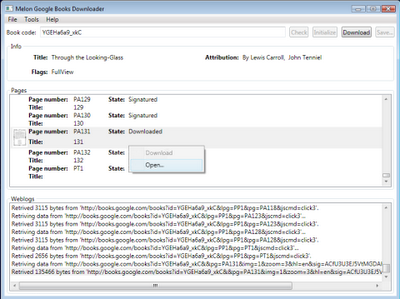
Google Book Downloader 0.1.0 can only download books which are marked as to full view. If you try to download copy write book then it not download all pages of book.
Download Google Book Downloader 0.1.0 Alpha 2.
Filed under google, search engine by on July 31, 2009 at 05:33
no comments
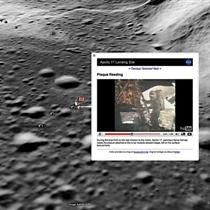
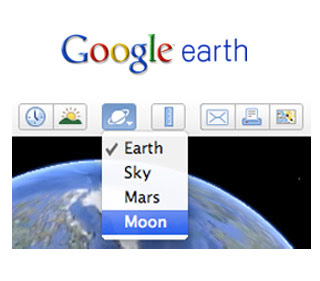
World celebrate 40th anniversary of the Apollo landing on the moon, on this remarkable event, Google is launching a new feature of Google Earth and this time it happens to be our old neighbour, The Moon. Many features of Moon in Earth related Apollo 11 stories come out with an interactive 3D medium using Google Earth.
Google Earth shows each of the Apollo landing mission through pictures and stories as well as video footage from Spacecraft films and surface panoramas of photos which was taken by the Apollo 11 mission crew members.
There is also a chance of Human Artifacts which contains locations and give importance of all small things on all spacecrafts that landed into the moon that time.
NASA used Historical Maps layers during the Apollo missions, which is also features of Moon in Earth.
If you want to see Moon in Earth, you must have to install Google Earth 5.0 version. Let Google fly you to the moon.
Filed under google, india by on July 29, 2009 at 11:01
no comments
Google India announced free service called Google sms channel,
If you are based in India than easily use this service at free you can received and send sms free any where in India,
you can also subscribe to news alert, blog update, and other information like cricket live score, jokes, stocks update, horoscope via sms,
This service is same like smsgupshup; smsgupshup has really good popularity in India, But now Google offering you this service with more than 150 charts. And smsgupshup only giving you 100 charts. and lots of advertisement there, where Google are not publishing any ad on sms, this is a major advantage of this service,
you can easily create your group and post sms, people joining your group and they get sms when ever you publish sms in your group, and there is totally security of your number, subscriber get sms from 9870807070, this is a common number to receive sms,
Google SMS Channels, currently available for Indian phone number only, soon may be available for others countries,this service is available in English, Hindi, Tamil, etc
link: Google SMS Channels,
Filed under google by on July 10, 2009 at 10:49
no comments
In what is certain to be the biggest tech story of the summer, Google is finally making official what has been rumored for years: It will create its own computer operating system, Chrome OS, slated for release in late 2010.While the news is stunning in its potential impact on the industry, it hardly arrives without warning. Google already makes its own cell phone OS, the fledgling Android, which continues to slowly gain devotees. And well before the company unleashed its own web browser, Chrome, many had long since assumed that Google had been preparing to release an operating system. When the Chrome browser was released instead, many observers actually saw it as a bit of a letdown in the news department.Now it’s clear what Google has been up to all along: Chrome is simply the centerpiece of a larger table setting, a full-blown operating system that will run without Windows or the MacOS beneath it.Google is keeping many details close to the vest — and, with at least a year before the OS comes out, it really has no choice since the OS has miles to go before it’s ready — but the company has made a few details public. Chrome OS will be open source, like Linux operating systems, upon which Chrome will be based; it will be designed to be “fast and lightweight, to start up and get you onto the web in a few seconds;” and it will be designed with security in mind (though, seriously, everybody says that). The OS will run on both ARM and x86 CPUs, the latter being the most common PC chip architecture on the planet, used on virtually every PC produced today. Despite the hints about Chrome OS, many, many questions remain. Obviously Chrome is designed with the web in mind, and it will undoubtedly be closely tied into Google’s extensive suite of services. But what will its offline components look like, if any? With Linux as a base, it will obviously be able to run Linux-based applications, though it won’t be compatible with Windows… or will it? Emulator systems exist that could let Chrome run Windows apps, but they’re complex and at odds with the goal of creating a streamlined, super-simple operating system. I am immediately curious as to how big of a hard drive a Chrome OS laptop would have, if it will have one at all.Another big question involves the hardware this operating system will run on. Google obviously has inexpensive, low-power netbooks in mind for Chrome OS, but will tinkerers be able to install it on computers they already own? Driver issues become a major obstacle at that point, as a “simple” OS can’t possibly account for the thousands of hardware variations present in modern PCs (printing alone is going to be a headache as it is). My hunch is that a downloadable version will eventually be available, but that it won’t be supported by Google at all should you decide to install it on a non-approved PC.That leads to the question of whether Google is ignoring a key part of the market. Netbooks are great little toys, but they’re hardly the tools of choice for those looking to get real work done. By embracing the web and largely ignoring offline applications, Chrome-based netbooks will by necessity remain tools for the low end of the market, playthings for when you’re not really being productive. Like the Linux-based netbooks before them, they just won’t do enough for many users.And that’s an ominous issue hanging out there for Chrome OS’s future. Linux-based netbooks haven’t been a rousing success, as Windows fought back with a vengeance after they hit the market, offering buyers a more familiar working environment and compatibility with their other computers while keeping prices down. Consumers have so far warmed up to the idea of having more features on their netbooks, not fewer, relegating Linux on netbooks to the background. Will a spiffy, Googleized version of Linux change consumer opinion? Maybe, but probably not dramatically. Contrary to public opinion, everything that Google touches does not turn to gold, and to be frank, Google has a serious uphill battle ahead for its OS ambitions. I’m cautiously optimistic that Google will put something brilliant together here, and can’t wait to get my eyes on the software, but the challenges it faces are extreme. Put together something too unique and different and consumers may be put off and confused. Or you could make an OS that clings closely to the Windows interface, but what would be the point of that?
Filed under google by on July 8, 2009 at 10:13
one comment
It almost sounds like a joke, but it’s true enough. Ever since Gmail was instituted in April of 2004 with the invitation scheme, it and many other of Google’s Apps have been wearing the beta tag. At long last, however, Google’s ripping it off like a bandage.
That ripping-off shouldn’t be too painful, though, as the bandage of beta has been stuck there for so long that it’s gotten soggy and lost its adhesive power. At any rate, though nothing glaring seems to have changed overnight, Gmail, Calendar, Docs, and Talk- personal and enterprise versions- all will be loosing the little “beta” underneath the logo.
Why, though? These products have remained in beta for years even though they exceeded standards of fucntionality most people define as “ready for final release.” According to the Google Blog, the over 1.75 million businesses who lay some of their communications foundations on Google Apps (including Google itself) probably aren’t too excited to be using software that’s still in a beta stage- it might seem less professional, and when you’ve your daily bread on the line, “beta” just doesn’t sound very reliable. Google has gone ahead and brought these applications up to a certain standard (well above an even 1.0 tag, in my opinion), and deployed the non-beta result to the world. Even though the beta tag hasn’t phased these 1.75 million businesses, I imagine a great deal more of them have been interested in Google Apps and will begin to look into using them soon.
Some may find that their beta icons are still affixed. It seems that Google’s rolling out the removal of the beta tag instead of doing at all at once just as they do with new features on the apps. However, some of us have become a little attached to that cute little beta sticker, and Google is no company to not provide advanced comforts, so they’ve added a new Labs feature in Gmail that “soothes the soul by putting the familiar beta sticker back on the Gmail logo.”
The beta’s officially over, but this doesn’t mean that Google won’t periodically add new and more functional features. Most of the millions who utilize Google’s applications probably won’t even notice as things will go on as they have for the past several years. All I can say is: kudos to Google. You’re all grown up.
Page 8 of 8« First...«45678

Recent Comments