About MohitMohan
Mohan Desai is from mumbai-India, student. love to write on stuffs related to Technology, Internet, computers, tricks, reviews, etc.
Website: http://www.mostlyblog.com/
MohitMohan has written 479 articles so far, you can find them below.
Filed under Software by Mohan Desai on August 24, 2009 at 12:18
2 comments
Windows Live Writer is well known tool for all Blogger, It is Desktop based Tool for Blogger to publish their blog content directly from desktop, And for that you don’t have to visit you admin account at wordpress you can write post with the help of windows live writer and you can publish your post from windows live writer , and even you can edit your post also,Still now windows live writer is one of the best desktop tool for blogger.
Key benefits of windows live writer :
- It support major blogging platform like Blogger, Wordpress, Self hosted wordpress blog, Typepad
- Spell check
- Offline editing
- Save post as Draft
- Change image size
- HTML editing You can use all features like wordpress
This tool is one of the best if you your main language is not English because it has spell check option which is really good you can click on right side and you will get some suggestion of your word select the right word ,
Link: Download Windows Live Writer
Filed under mobile by Mohan Desai on June 13, 2009 at 08:10
2 comments
Nokia is one of the main player in Indian telecom industry,Nokia is specially known for there brand and mobile is simple to use, Nokia has started N SERIES and they laUnch to many mobile phones like N70,N72,N95,ETC , now Nokia launch another great mobile that is NOKIA N97
Nokia N97 IS touchscreen phone, it has really good style and look. it is a touchscreen mobile phone along with Qwerty keyboard.
take look at feature:
- S60 5th edition
- Advnced sensor technology
- Adobe flash lite integrated
- optimized for browsing
- pre installed facebook application
- screen resolution of 360 * 640
- 5 megapixcel camera along with carlzeiss lens
- 32GB inbuild memory
- 32frame/sec video recording
Filed under tricks by Mohan Desai on May 23, 2009 at 12:21
no comments
When ever you start your computer at that time your computer taking so much time to start . i hope that you all facing this kind of problem.
Today i am going to tell you a basic tricks, okey i am not taking more time, latest start
first off in the bottom right hand corner of your computer if you see alot of icons start up there when you first start your computer then this is for you if you dont know already how to get rid of em.
Press your Start Button (bottom left) and go to “run” or click window button + R
Now type : msconfig
Now you will get a box that pops up and will tell you bunch of stuff dont mess with anything else other than what I tell you otherwise you could do something really bad (possible) go to your “startup” tab on the top right of the screen where it usually is and click it.
Now you will have a closed in box with bunch of filenames n addresses and more boxes with checks in them. Now if your like me you dont want anything startin up when you start you computer up or while your even doing anything cause it slows you down. Now unless your like me right now 1 have 1 thing starting up when my computer starts up and thats my setting for my overclocked vid card. But other than that uncheck every box and then hit apply and ok. Then window you were jus in will now close and ask you if you want to restart or wait till later to restart.
NOW RESTART YOR COMPUTER.
if you have any proble than pless write in comment box
Filed under website by Mohan Desai on May 23, 2009 at 12:11
no comments
Hope you all know about this SmSgupshup, there still so many people who doesn’t know that how to use this site smsgupshup is really rock, this is one of the fastest growing site,
How to register:
just visit smsgupshup.com and register for free it will take only few minets to register.
Join group:
after registeration now you can use all services,if you want fress sms on your mobile then search your faviurate group and join that group, now you get frees sms on your mobile when group owner publish sms in his group. this is realy great feature of this site. and there is full securacy for your number.
How to Crate group:
if you want you can also start a new group for free and publish your sms in your group. in starting days of this site they the give us to send or recive sms of 160ch. but now they reduce the charactare. now you can send/recive sms of 100ch only.they have done this for advertisement purpose.
take quick look at some featuers of this site
- send free sms in any number
- join group and get sms on your mobile
- create group and send sms
- you can only send 8 sms perday
- there is no limitation of group memeber
if you know more bout this site than plese write in comments
Filed under twitter by Mohan Desai on May 21, 2009 at 07:30
no comments
New in twitter? No follower?
Hope few of you thinking about this that how to get more followers? The answer is so simple read this post.
The Top Ten Twitter Celebrities Include People Like Barrack Obama, Arnold Schwarzenegger, Lance Armstrong. Twitter has grown exponentially since its creation, with the micro blogging service now hosting roughly 8 million unique user
Given such popularity, it’s almost inevitable that celebrities and luminaries would utilize it as a Platform to promo their work & stuff
follow me (http://twitter.com/mohitmohan)
write your comments in comments box
Filed under mobile by Mohan Desai on May 15, 2009 at 07:56
no comments
The Nokia phone Company has finally decided to come up with a new phone that has completely new features from the previous XpressMusic series. There are other Nokia XpressMusic phones available and this will just be an addition to the family. The phone is numbered Nokia 5730 XpressMusic and comes with a QWERTY keyboard and a side slider.
Since everyone nowadays seems to be on one social network or the other, the good thing with this phone is that it has support feature for such social networks as Facebook, Myspace and Youtube. The phone is quite pretty by appearance and is equipped with keys dedicated to games so playing your favorite game such as the inbuilt N-Gage from this phone will be a whole new experience. The QWERTY keyboard on this phone means an improved messaging service. This keyboard looks like the normal ones we use with computers hence typing texts will be faster. The home screen will have the XpressMusic feature that you can use to access music, games, email and calendar and you can download as much music as you want to the phone. The screen offers a variety of colors and a pleasant display.
The phone is equipped with an inbuilt speaker for excellent sounds but you will also be able to use any headphones via the AV plug that comes with it. The battery is another added advantage as it has a long life of up to about 25 hours of play time. The music shortcut takes you to the Nokia Music store where you can browse for music information online. For music lovers, this is an ideal phone as it offers a lot of music capabilities that you could enjoy.
The phone also has an auto focus camera that you will use to take photos which you can upload online for friends and family to see. Other features include Bluetooth which will allow you to exchange data using your mobile phone over short distances. The phone has a 128 MB random access memory (RAM) and an internal storage of 140 MB. The software application used is that of Symbian S60 3rd edition technology and you will only have two colors to choose from, that is, red or blue.
Although the Nokia 5730 XpressMusic is quite heavy, it is surely going to be a real competition in the phone handset market once it is out, owing to its outstanding features.
Filed under mobile by Mohan Desai on May 12, 2009 at 11:07
10 comments
Samsung Star (S5233) is a 11.9 mm compact phone sporting a 7.63 cm WQVGA full-touch screen. There is a feature called Photo Contact using which one can call a contact by simply touching an image. A stylus is added too. The phone has an impressive 3.2 mega-pixel feature-rich camera with smile recognition. Gesture Control is another feature that the company has started to equip its latest cellphones with. Using Gesture Control one can unlock the Touch Screen or run an application by giving a gesture command.

This phone supports 50MB internal memory which is expandable up to 8GB through memory card. Samsung ’s TouchWiz User Interface is another feather in its cap. The phone has music recognition capability utilizing Shazam’s “Find Music” service. There is virtual QWERTY keyboard for messaging and handwriting features. All these features come at an affordable price tag of 11,100/-
Filed under mobile by Mohan Desai on May 12, 2009 at 10:59
no comments
Samsung has strengthened its touchscreen portfolio by announcing the launch of Samsung Star & Samsung Star 3G full touch screen mobile phones in the Indian market. Boasting compact designs and intuitive usability, the products are aimed at customers looking for full touch mobile phones at more affordable price points.
Samsung Star represents the first touchscreen mobile phone that the company is manufacturing at its manufacturing facility at Noida. Samsung also announced the launch of its innovative, music phone with touch screen functionality,
Samsung BEAT DJ mobile.With the launch of the three new touch screen mobile phones, Samsung now has a portfolio of seven touch screen phones, ranging from Star to its flagship touch screen phone, S8300 Ultra Touch mobile launched last month.”Samsung Star and Samsung Star 3G are significant additions to our full-touch screen mobile portfolio, featuring all the essential functions in one single device. At Samsung, our effort is to deliver various full touch mobiles for every consumer lifestyle,” said Sunil Dutt, Country Head, Samsung Mobile Division.
Filed under earn money online by Mohan Desai on May 9, 2009 at 07:48
2 comments
Infolinks is an in-Text advertising service that allows you to quickly and easily make money off your website’s or Blog content, Infolinks acts as a middle man that make the arrangements with all of the advertisers so you don’t have to letting you just focus on earning money.
About few month ago i was approached by infolinks to start using their in-text Advertising service at the time i was using another in-Text advertising service called kontera and AdBrite (i am still using AdBrite on my other blog) once i started using their service. It’s extremely simple to setup on your website or blog.
They provides full detailed reports summary for every day. And it’s pretty relevant for the most part. when it comes to setting infolinks upon your website all you need to do is copy the java script code they provide for you into either the Header or Footer of your site.
Overall infolinks is a solid service that provide and quick and easy way to generate money online through in text advertising.
Filed under Bloging by Mohan Desai on May 9, 2009 at 07:35
no comments
In Text Advertising is when certain keywords on your website or blog are used as means of advertising. The Advertisements appears in a link from which when clicked will bring you to the Advertisers website or product page. These type of Advertisement can be very useful and can also genrate revenue for the publisher with very limited work.
The advertiser’s ads are only displayed when a reader passes the mouse over or clicks on selected hypertext links. Upon clicking the hypertext link, a small window is displayed containing information related to the hypertext words. The hypertext appearance is usually different than the style used for non advertiser links.
For example, a web page with information on auto insurance may have the words “automobile insurance quote” associated with an advertiser’s hyperlink. Upon clicking the link, a small window with more information on automobile insurance is displayed. The advertiser may be an insurance company, an agent or an auto dealer. If the reader further clicks on the pop up to find out more information, the webmaster earns money. The amount of money each ad generates depends upon the type of site, amount of traffic and the advertiser.
Filed under Bloging by Mohan Desai on May 9, 2009 at 07:18
9 comments
AdBrite is a market place to buy and sell Ads. They have been around for a very long time and it shows. AdBrite have very large marketplace. The mode of Advertisement used by AdBrite is CPC(Cost per click), CPM(Cost per impression) and CPV(cost per view).
- CPC:This means that the Advertiser pays every time someone clicks and is directed to the site. This method is very effective if the site hasa large number of visitors meaning that they will be able to see the ad setup for the advert setup for the Advertiser by AdBrite. Every time they get into the site.
- CPM: COST PER IMPRESSION or cost per thousand work when AdBrite put up your Advert and you are charged every time the advert makes animpression.
- CPV: Cost per view just works as the name suggests. AdBrite will charge the Advertiser every time the advert is viewed by the client.
Amount made: The least amount one can make with AdBrite is $100 but when choosing the publisher can set it to be as lower $5
payment mode and time of payment: AdBrite does their payment via check.They not having facility to pay-via paypal. In future we hope that AdBrite introduce this feature also.The payment is done after every two months.
Ad type: AdBrite run different adverts to market the advertiser. These are
- Text Ad’s
- Banner Ad’s
- Rich media Ad’s
- Full page Ad’s
- Inline Ad’s
- Brite pic
what you have to do?: you have to only sing up with AdBrite.Com and than select your ad type. Than you will get HTML code and than copy that code on your site or blog.It take 3hr to start.
Filed under mobile by Mohan Desai on May 6, 2009 at 11:52
no comments
There’s no doubt that SonyEricsson phones are the new in-thing. From being just another mobile manufacturer, it has risen to be a formidable competitor to Nokia and others. Perhaps the only problem with SE phones is that you can’t always trust them to be consistent
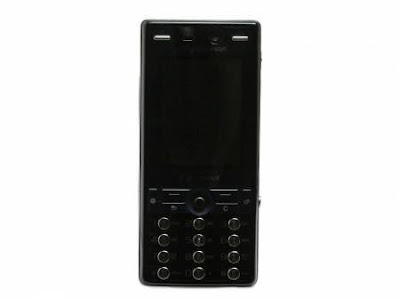
Take the K810i for instance. As an upgrade for the K800i, it’s a sorry attempt. But as a standalone device it’s brilliant, at least in certain aspects. Before anything else, let’s talk about the form factor.
Speaking of the design of the K810i, SE has taken big strides in making its phones look like no other. In many instances, they managed this by compromising on ergonomics. The K810i, for one, has tiny rounded keys that look uncomfortable. (I, however, liked them.) They are evenly spaced and are big enough to hit accurately with only one eye open. Having said that, I won’t deny the keys look rather ugly.
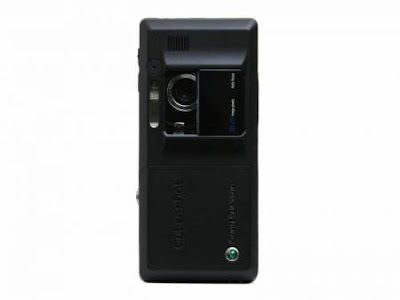
At 106 x 48 x 17 mm, the phone is quite bulky and causes a rather alarming looking bulge in your pocket. I feel the 3.2 MP camera is one of the reasons for this excess flab. So you need to decide what is it you really need before you pick up this handset.
If you look closely, you will see two keys just above the 2-inch TFT screen on either side of the earpiece. These are camera shortcuts that enable direct access to the pictures clicked. For navigation the phone is equipped with a five-way joystick, which is quite responsive.
My fat fingers had a bit of a problem using the two open keys (Call and Menu) and the Back and Cancel buttons. On several occasions I ended up hitting the Shortcut key. The screen supports 240 x 320 pixels with up to 256k colors and is adequate to the task.
Filed under mobile by Mohan Desai on May 6, 2009 at 11:22
no comments
Camera mobile phones have come a long way since their inception. What once were devices meant to take candid pictures without much thought given to their quality, have now turned into serious tools for photography. We now have mobile phones with advanced technologies like autofocus, optical zoom, face detection, smile detection and, of late, some camera phones have even had blink detection. Even video recording standards have gone up and we now have mobile phones that can record videos in HD resolution.Now that summer is here and many of us are planning to take a vacation, we would need something that is small enough to be carried around everywhere without compromising on picture quality. You can buy one of those compact digital cameras but why carry two devices when you can have both in one?So here’s a compilation of the top camera mobile phones that you can buy. These are camera mobile phones we have tested and know that they would provide you with the best picture quality in that price range. So when you come back from your vacation, you can have high quality photos that you could cherish forever
1.Sony Ericsson K810i:
Easily one of the best camera mobile phones that the Swedish company made; the Sony Ericsson K810i still rocks even after two years of being in existence. The Sony Ericsson K810 has wonderful picture quality, which is complemented by the awesome xenon flash that makes it a great tool for photographing in the dark. Colors are natural and exact, which will definitely please the purists. Macros, which have always been a forte of Sony Ericsson phones, are delivered with aplomb.The 3.2 megapixel resolution might not seem much, but for all practical purposes it is more than enough for a mobile phone. You also get a convenient lens cover, which will start the camera when slid open and protect the lens when closed. Only major flaw that I can point out is the low resolution video recording. But apart from that this phone lives up to the CyberShot brand name, and at Rs. 10,000/-, you cannot get a better camera mobile phone.
2. Motorola ZINE ZN5:
Motorola shied away from camera mobile phones for a long time, conveniently ignoring it and equipping its phones with the same old boring 2 Megapixel camera. But then they finally thought enough was enough and decided to make an entry into the camera phone market. And what a device they chose to make that entry! The picture quality rocked and even taught long time camera phone makers Sony Ericsson and Nokia a thing or two about making camera phones. Motorola partnered with Kodak for the software part but the hardware is their own.The 5 megapixel sensor captures superb details, but what really impresses are the lush warm colors that bring the images to life. At night the brilliant xenon flash comes to the rescue and the lens cover protects the lens from scratches and dust. Video recording, however, is once again a weak point for the Motorola ZN5. Priced at Rs. 15,800/- the ZN5 is terrific value for money and a superb camera phone.
3. Nokia N82:
Nokia’s best camera mobile phone; the Nokia N82 has almost everything that a camera phone should have. A 5 megapixel sensor, renowned Carl Zeiss optics, autofocus, xenon flash and a lens cover. All you could have wished for is optical zoom. The Nokia N82 produces some fantastic pictures that will at times make you wonder whether it really came out of a mobile phone. Little wonder that it is the most popular camera phone today and the Internet is littered with pictures by Nokia N82 photographers.But what really seals the deal in Nokia N82’s favor is the superb 640×480 (VGA) resolution video recording at 30 FPS. The videos not only look great on the phone but also on the PC screen. What’s more, the mobile can also use the built-in GPS receiver to Geo-tag the images, so you know exactly where you have taken them. Priced at Rs. 18,800/-, the Nokia N82 is the best camera phone that you can find under Rs. 25,000/-.
4. Sony Ericsson C905:
We often stress that camera resolution isn’t everything when it comes to digital cameras and that the final picture quality depends on a lot more factors other than the megapixels that it has. Having said that, a higher megapixel count also translates into a more detailed image, so it is always better to have as many megapixels as you can afford.The highest resolution that you can have in a mobile phone camera today is 8 megapixels. Sony Ericsson was the first to bring out an 8 megapixel camera phone; the Sony Ericsson C905. Along with an 8 MP sensor, they have also armed the phone with autofocus and xenon flash along with a nifty LED flash. This works as focus assist as well as a lamp that constantly stays on for video recording in the dark. A well-designed lens cover mechanism protects the lens from damage.The quality of the images is really good. The high resolution sensor works its magic in capturing even minute details of the subject. In low-light conditions, the powerful xenon flash can make your images turn out great. The C905 can also Geo-tag its images with the help of the built-in GPS. The only area where you wish its performance was better is video recording, as the C905 still captures videos in QVGA resolution at 30 FPS.Having said that it would be hard to find a phone with better picture quality, and at Rs. 26,000/- the Sony Ericsson C905 is the pick of the lot.
5. Samsung INNOV8 (Samsung GT-i8510):
Samsung was the first one to actually tease everyone with its absurdly high resolution cameras in mobile phones, long before anyone else did. But those were all prototypes that never saw the light of day, except for the Samsung INNOV8.In a bid to have everything but the kitchen sink, Samsung included a superb 8 megapixel camera in the INNOV8. The Samsung INNOV8 might lose out to the Sony Ericsson C905 when it comes to having a xenon flash on board, but it more than makes up by having better picture quality during daytime with more details and warmer colors.What’s more, the Samsung INNOV8 is also capable of recording videos in VGA resolution at 30 FPS, something the Sony Ericsson C905 cannot do. It also has a massive 16GB built-in memory with option to expand it further, so you’ll never have to worry about running out of space for your favorite photos and videos. Priced at Rs. 37,000/-, the Samsung INNOV8 is a bit too expensive, but that’s more because of the overall package that it offers than just camera performance. Along with the Sony Ericsson C905, it is one of the best camera phones that you can buy.
Filed under Bloging by Mohan Desai on May 1, 2009 at 08:08
no comments
You do not have to be a web guru to start a blog , its so easy any one can create blog, here are some step by step information to create a Blog.
There is a wide range of blogging tools out there. Some free, some not.If you want to start blog free and not want to invest money then try Blogger.com or wordpress.com , this two are widely used blogger platform , i suggest you use Blogger.com
i know you are thinking that why Blogger.com ?
Why Blogger?
Well for a few reasons:
1.) It’s Free!
2.) It’s a breeze to setup and
3.) Google owns it. Yeah, the same Google that’s helping us to find what we want. the giant search engine.
Now big thing is select your blog niche, yes this is very important because without niche you can’t get success, take time and then search for your niche select That niche in which you have interest and knowledge, you can start on any niche it doesn’t mean that your friend have Tech blog so you also have to start on same niche? no dear your wrong you have find best niche for your blog.
Ok, so you have your blog topic (or maybe not but you will soon…right?) I’m going to get you hooked up to the service in no more than10 minutes (times will vary for animals and small children). At the end of this you’ll be ready to start writing up some content, free of charge
Here are step to create blog follow this
1.) Go to
Blogger and sign in with your
Google account. If you don’t use any Google services like Gmail you can create a new account
here.
2.) Click on the “Create Your Blog Now” button arrow on the bottom right and fill in the information
3.) Name your blog and give it an address. Make sure the name is meaningful and not too long.
4.) Choose from one of the many templates available
5.) Your blog has been created!
If you have any Question regarding this then put your comment below the post

Recent Comments